
Our Work Process
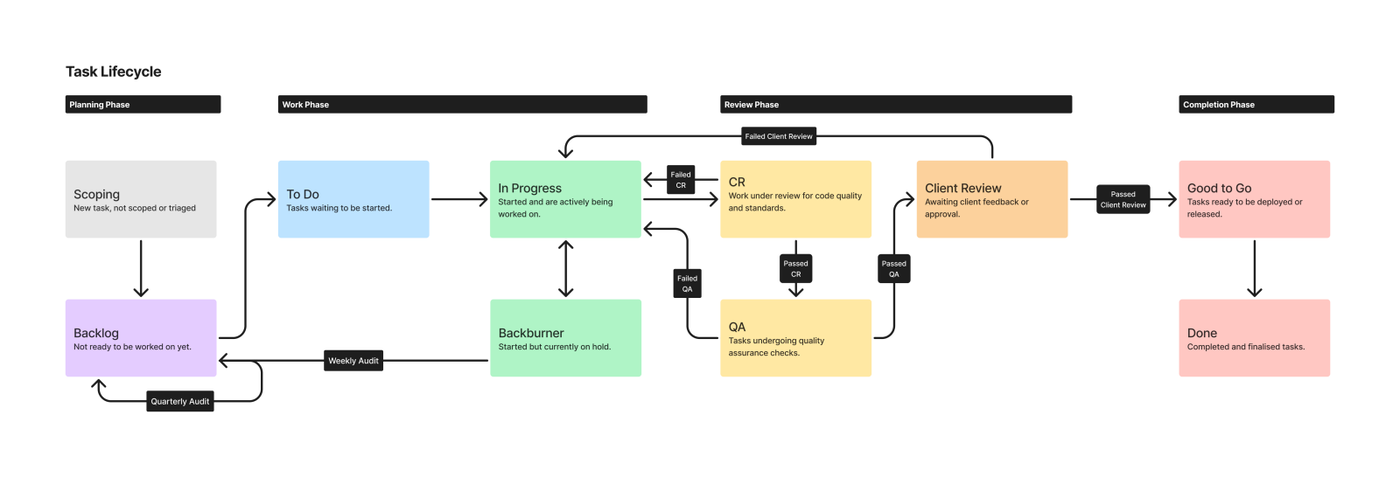
This process outlines the flow of tasks from planning to completion, divided into four main phases: Planning Phase, Work Phase, Review Phase, and Completion Phase.
Planning Phase
Scoping
New tasks start at this stage but have not yet been fully scoped or triaged.This phase often involves investigation, meetings, and discussions on the support desk, ultimately leading to task creation. "Scoping" is not a status applied to tasks, as it represents the initial step in creating a task.
Backlog
Tasks not ready for immediate work are moved to the backlog. These are reviewed during the Quarterly Audit.
Work Phase
To Do
Tasks ready to be started.
In Progress
Tasks actively being worked on.
Backburner
Tasks on hold or blocked for any reason. A Weekly Audit ensures Backburner tasks are reviewed and cleared regularly.
How the Backburner Status Works
Review Phase
A fail at any review step moves the task back to “In Progress”.
Submitting a pull request (⚠️ update required)
Reviewing a pull request (⚠️ update required)
CR (Code Review)
Tasks are reviewed for code quality.
[page on the CR process]
QA (Quality Assurance)
Tasks that pass CR move to QA checks.
[page on the QA process]
Client Review
Client-facing tasks undergo final client review.
[page on the Client Review process]
Completion Phase
Good to Go
Tasks approved for release or deployment.
Deploying to a live environment
Done
Final state for completed and closed tasks.
OLD
QA Process - Overview
When an Engineer has completed work on an issue in GitHub, they will move the card into the QA column.
Usually if you are to do the QA on the work, you will be assigned to the issue to review.
Once you have opened the issue there will be a list of test steps provided by the Engineer who has worked on this particular issue.
Writing the testing steps…
These steps have been taken from the GitHub Wiki for Engineers but can be useful for understanding what is needed for testing, regardless of your position.
Description
Provide a simple description of the work, giving context to the desired outcome. (what does success look like?)
Location:
It is assumed that all QA will take place in the staging environment, if this is not the case please include which environment is required for testing in your notes. Detail where on the site this needs to be tested, both on a high level and detailed level; such as if this is in the CMS, on the front end, on a specific page, in the header or footer, settings, etc. Assume the tester has a basic understanding of WordPress/ understanding of this site.
Test:
Ensure you are using Github’s checkbox and list features. Checkboxes should be used only on steps that are to be validated with a pass or fail, ensuring you detail what success looks like for each of these steps. An example checklist would be
-
Do something
-
Try something else
-
I confirm this worked Additional context or instructions are to be included in sentence or list format.
Amends:
Following review /amendments from the Overseer for any failed QA tasks, or there has been additional feedback from the client, please include a new checklist per round of amends. Include the new steps isolated here if possible, otherwise if needed for the specific PR, include all previous test steps with the new steps integrated in the proper order required for validation.
Considerations:
Any notes or additional information that the tester might find helpful to keep in mind, such as notes specifically from the client, if this is a global issue, is there another ticket on the board that could affect this work, etc. Re-read your notes and check that they make sense to you before submitting your pull request
Resources:
Include screenshots (before & after), designs, Loom videos, or other links and resources that add value such as related support tickets, docs in the drive, or other related GitHub issues. Assume the tester has never touched this ticket before.
Flow Chart:
[TBC]
Using GitHub board - Reviewers etc
When the works have been completed by an Engineer, whoever needs to review the work needs to be added as a Reviewer.
This will include Code Review from a different Engineer but should also include whoever is due to QA the work.
Using this functionality allows it to be more transparent for whomever is undertaking the QA process as they are aware from the get go that input is required from them.
Adding your feedback
If you are assigned as a reviewer you should add your QA notes to the issue.
Click “Review Changes” and you should see the below box pop up.
Should you have any notes following your testing you should select “Request Changes” and put any feedback you may have in the “Leave a Comment” section of the pop up.
This will allow the engineer who carried out the work to keep track of the issue.
Move the card back to “In Progress” so the Engineer can identify visually that there is work to do on this again.
The Engineer will move the card back to QA once they have completed the changes required.
Once all bugs and issues have been resolved and you are happy that the work passes all the test steps provided, click “Approve”.
Move the card over to ‘Client Review’.
Client Review
Following the completion of the internal steps, the work may now be handed over to the Client. How it is handled depends on the following:
-
The nature of the thing being handed over
-
The client’s temperament
Things to hand over…
This ranges from:
-
A simple note saying we have fixed a bug and deployed something to live
-
Giving the client a link to something on staging with instructions and context
-
Handing over a whole site with documentation etc
If something is a small bugfix, we usually skip client review and just let them know it’s live. You should test this yourself though before handing it over to the Client.
If there’s a new feature added, sometimes a single screenshot and some bullet point instructions distilled from the QA test will be enough.
If it’s a bigger feature, maybe record a Loom showing how to use it.
If it’s really complex, we should hand over a document with detailed instructions and screenshots of where to do things and how it looks on the front end.
A test sheet is also really important. This provides proof that we have tested everything first also. (Palram Where To Buy testing is a good example)
If a site is not live yet it can be handed over later in a document that covers the whole project rather than in bits. It’s good to keep a note of things that have been QAed for a new project though as we can compile them into a document based on QA tests etc later down the line.